EODIGO

Open EODIGO from your home screen

Add it to your home screen in your mobile browser for quicker access.

QR code for the EODIGO website
Continue on your phone

Open EODIGO with QR

Scan with your camera, then follow the guide below to add it to your home screen.

eodi-go.com

iPhone · Safari

Open EODIGO, then choose Add to Home Screen from the Share menu.

Official browser guide ↗

Android · Chrome

Open EODIGO, then choose Add to Home Screen from the More menu.

Official browser guide ↗

Menu names and positions may vary by device and browser.

EODIGOWhere to today? EODIGO

Open EODIGO from your home screen

Add it to your home screen in your mobile browser for quicker access.

QR code for the EODIGO website
Continue on your phone

Open EODIGO with QR

Scan with your camera, then follow the guide below to add it to your home screen.

eodi-go.com

iPhone · Safari

Open EODIGO, then choose Add to Home Screen from the Share menu.

Official browser guide ↗

Android · Chrome

Open EODIGO, then choose Add to Home Screen from the More menu.

Official browser guide ↗

Menu names and positions may vary by device and browser.

List your business

Business registration and plans

Promote your business

Introduce your business to customers looking nearby

Start with a free Standard listing. Choose Pro for a dedicated website.

NuguGO introducing business promotion subscriptions
Free business listing

Introduce your shop with one photo.

Start with a sign or storefront photo, then check your shop details.

List for free with a photo →Published after review · You can leave both phone and email blank.
How photo registration works

Choose a sign photo → check shop details → send a free request. We publish after review.

Business promotion subscriptions

Plans

Listing a business is free. Pro adds a business website and more business tools.

  • standard

    Standard

    Free

    Basic listing for your business

    • Business published after admin review
    • Address, phone, hours and directions
    • 1 main photo + 6 signature menu items with prices
    • Shown across all 8 languages
    • 🎁 Korean booking requests (a Pro feature) are free as a launch offer — we will let you know 30 days before it ends.
  • pro

    Pro

    Recommended

    Launch offer 52% off$60 / month

    $29 / month

    1-year plan · $348 billed once a year

    Launch offer 42% off$60 / month

    $35 / month

    1-month plan · Billed monthly · cancel any time

    Your business website inside EODIGO

    • Everything in Standard
    • Business website creation and hosting
    • Your business address (eodi-go.com/city/shop) + a short link for QR
    • Full menu and detailed price list
    • Korean booking requests — delivered in your language by email

Prices are monthly, in US dollars. Pay directly by card on the payment page. A plan does not guarantee a verification badge or organic search ranking.

From card payment to your business website

Pro includes a dedicated business website. EODIGO handles creation; you review the materials and preview.

These are examples from the Korean screens, with guidance in your selected language. Layout and schedules vary by business.

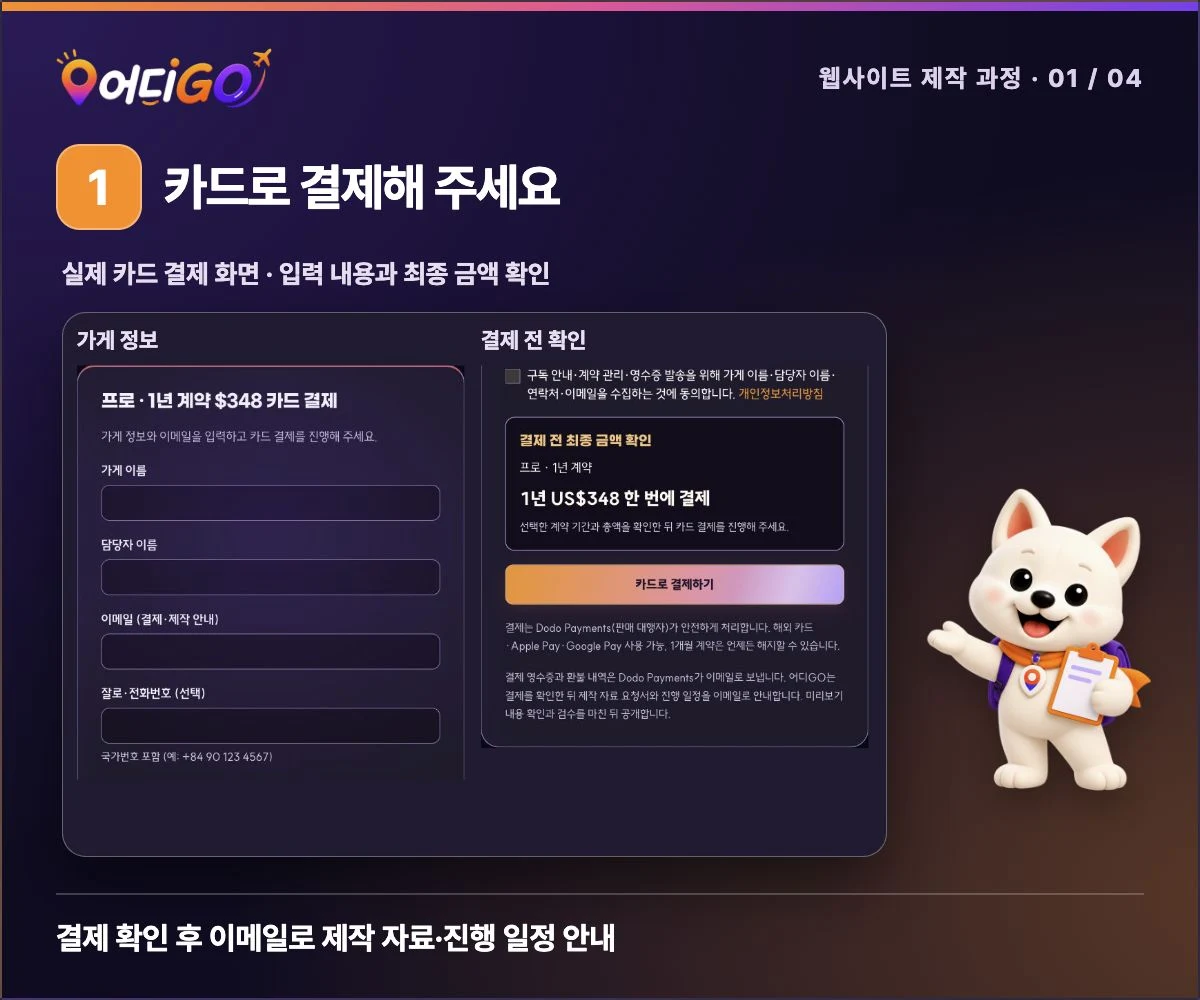
  1. Pay by card

    Choose your plan and contract period, then pay by card.

    After payment is confirmed, we will email you the schedule.

    View original screen example (Korean)
    NuguGO with the current EODIGO card checkout formView original screen example (Korean)
    EODIGO card checkout · empty form example
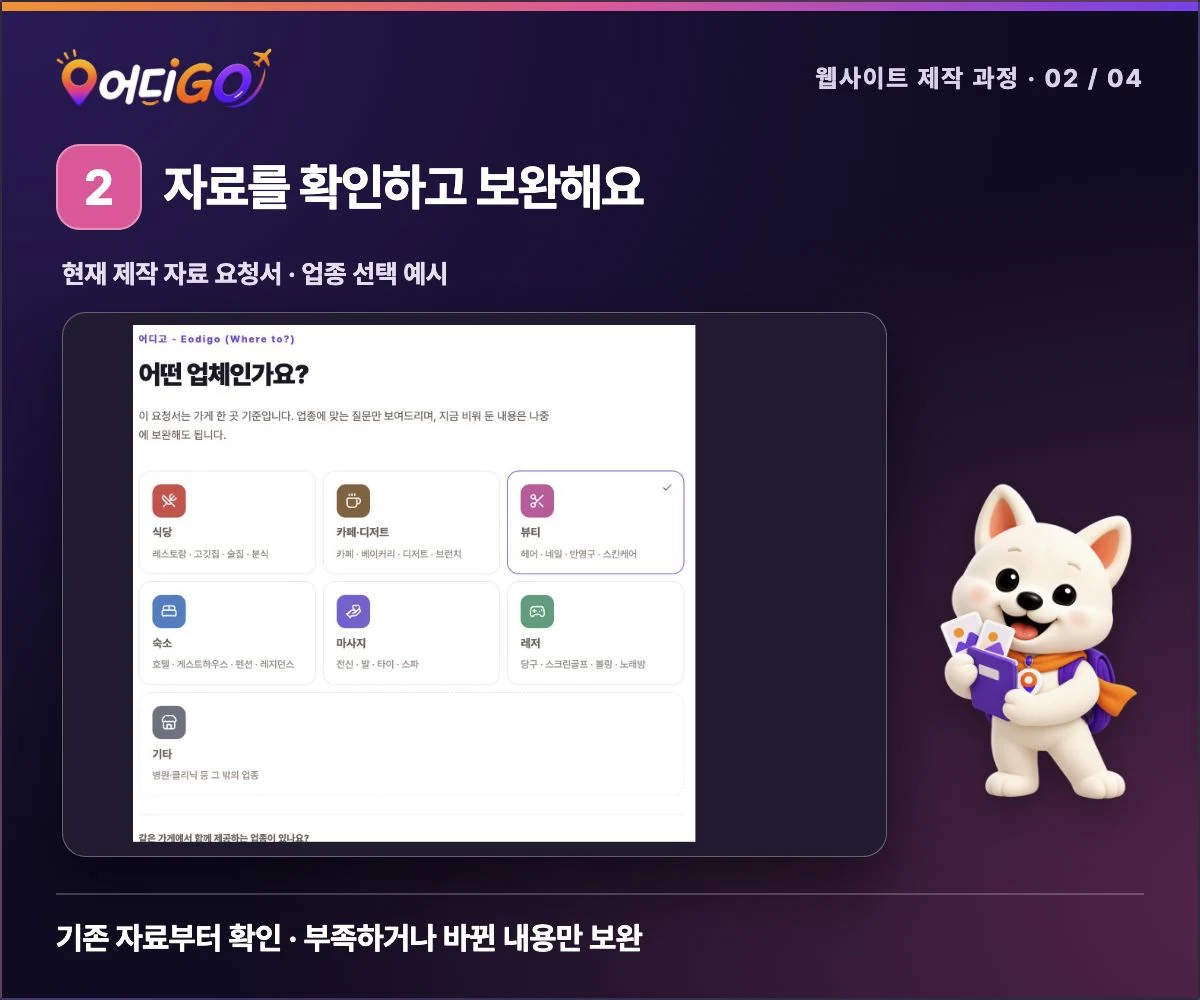
  2. Review your business materials

    After payment is confirmed, we email your business-specific materials form. We review existing materials first; add only missing or changed information.

    After checking usable photos and menus, we agree on the scope and preferred layout.

    View original screen example (Korean)
    EODIGO production materials form · business category selectionView original screen example (Korean)
    EODIGO production materials form · business category selection
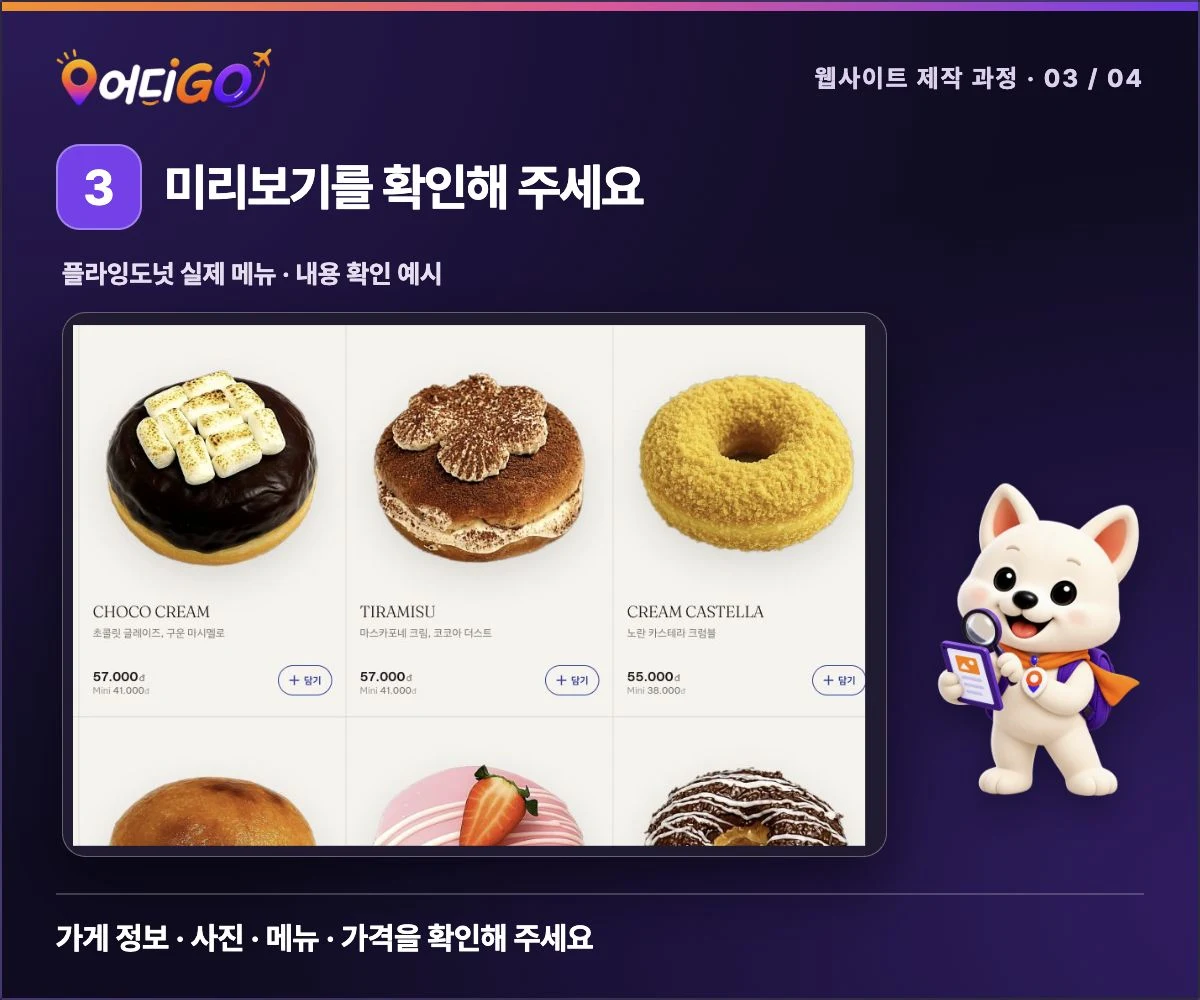
  3. Check your preview

    We create the website using the verified materials and agreed scope.

    Review the business information, photos, menu and prices. Send corrections through the contact channel provided.

    View original screen example (Korean)
    NuguGO with a tablet and magnifier beside Flying Donut’s real menu and pricesView original screen example (Korean)
    Flying Donut public menu · review example
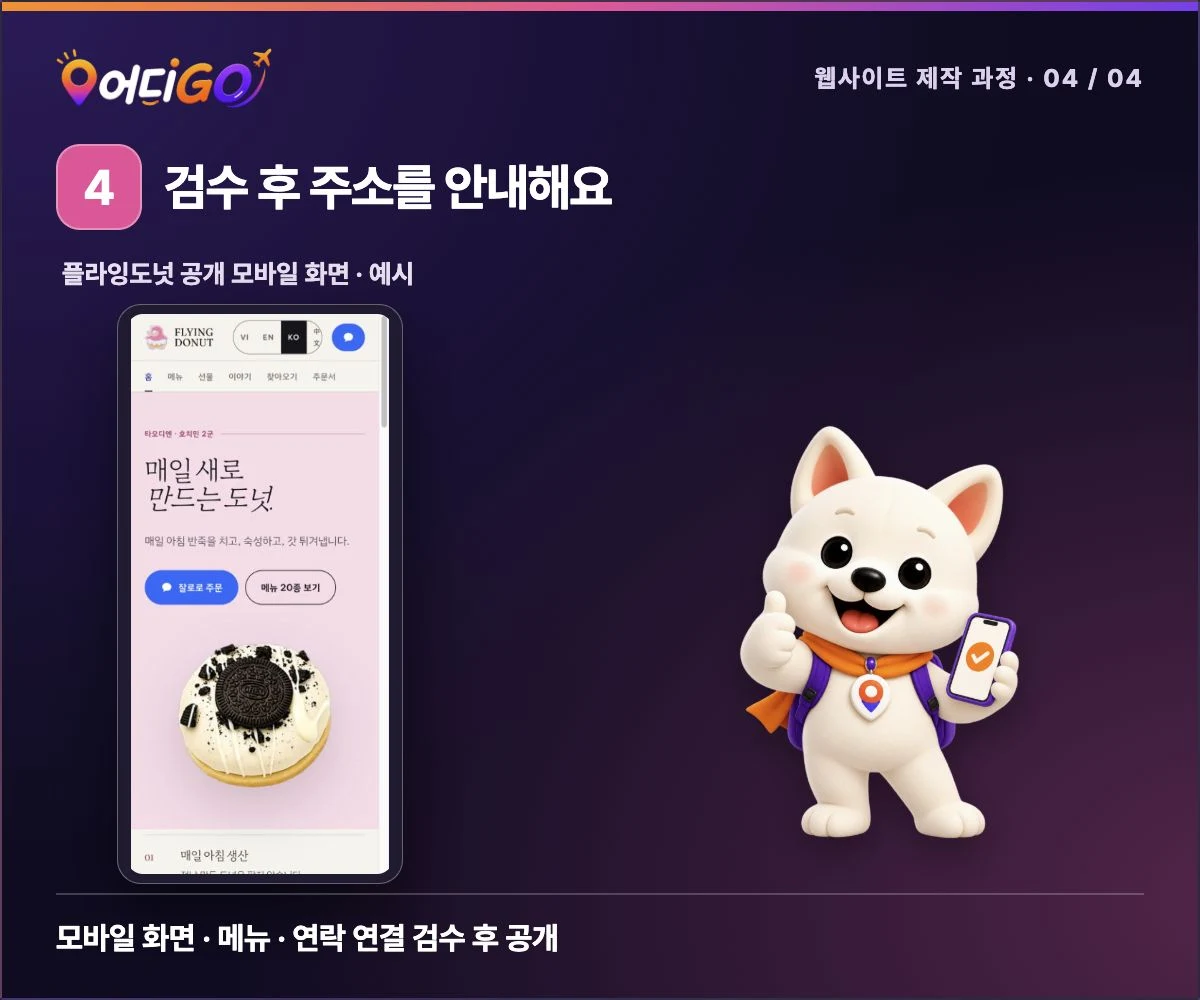
  4. Receive your address after review

    We check the mobile layout, menus and contact links against the approved content and publication conditions.

    Once review is complete, we send you the public business website address.

    View original screen example (Korean)
    NuguGO with a smartphone introducing Flying Donut’s public mobile websiteView original screen example (Korean)
    Flying Donut public mobile website · completed layout example

Materials needed for your website

You do not need to prepare materials you have already sent again. We check them first and request only what is needed.

Basic information
Business name, address and map location, opening hours and public contact details
Introduction and photos
Business introduction, main photos and your logo file if available
Menu and prices
Menu or service names, prices and currency
Contact channels and layout
Channels for bookings, orders and enquiries, plus your preferred layout

Send only photos you have permission to use on the website. For food photos, specify the matching menu item and price.

Website creation FAQs

Is my website published immediately after payment?

After payment, we review your materials and complete checks before publication.

We will email the schedule after checking payment, the required materials and the scope. Publication dates are not confirmed before these checks.

Can I apply with incomplete materials? When will I know the schedule?

We review existing materials and request only missing items.

We will email the schedule after checking payment, the required materials and the scope. Publication dates are not confirmed before these checks.

What if information changes after publication?

Send the changes and related materials through the contact channel provided.

We review the request and service scope, then explain the changes we can make.

Frequently asked questions

Questions about each plan

Choose a plan and open a question to learn more.

Standard

For a free introduction to your business

Register free
Is it really free?

Yes. Standard is a free listing that publishes your business information.

What should I prepare?

Prepare the business name, country and city, address, public contact details, opening hours and an introduction.

You can add one main photo and up to six signature menu items. Please also prepare menu photos and prices in the local currency.

Will my business appear immediately?

No. An administrator reviews the information before deciding whether to publish it.

Can a free listing receive booking requests in Korean?

Free as a launch offer — we will let you know 30 days before it ends.

Requests are sent to your business contact channel. A booking is confirmed only after your business checks it.

Before you apply

How do I pay?

Pay directly by card on the payment page. Dodo Payments handles payment and accepts international cards, Apple Pay and Google Pay.

How do monthly and annual contracts differ?

Monthly contracts are paid each month and can be cancelled at any time.

Annual contracts have a discounted monthly equivalent, with the full year paid upfront. Check the period and total before applying.

What is the refund policy?

The 1-year plan is paid upfront for the year. Periods already paid are not refunded; duplicate payments and cancellations before production starts are refunded in full.

Register free with Standard

Standard is a free listing: submit your business details and we publish them after review. Registering never commits you to ads or payments.

Enter your basic business details and introduction. You can also add a main photo, menu items and prices.

Register your business free